July 14, 2010 - 7:09am — Bylah
Dear You, Who Shall Remain Unnamed And Could Stay That Way By Never Replying Here, But I Think You Will Because You Will Feel the Indignant but Incorrect Urge To Defend Yourself for Acting Like an Unmitigated Weiner for No Real Reason,
You know, I said I wasn't going to comment much around here anymore, and that stands true. I've been quiet.
I've pulled Bylah out just a handful of times - mostly for special occasions, and for the most part, that's fine too.
Unless you're just not savvy on present events, MOST people here know that Bylah and Nine are close. If you pay even more attention, you know that Bylah is also close to Kaoori and Jettem, and Takeshi by default, being Kaoori's kid and all.
So chances are, to see them all sitting around, it's like a rare family reunion.
So when you decided to show up? I have a feeling that you knew this was probably a rare sort of deal. Bylah, Nine, Jettem, Kaoori, Tata, Takeshi, all in the same spot? Oh yea, THAT happens a lot. Even if you DIDN'T, you were politely - and privately - asked not to start something. Because let's face it: you're character is known for starting things.
Yet, you did so anyway. Your character hung over us like a vulture, waiting for the opportunity to arise in which he could do his thing.
If I wanted to, I could lambast you. I could really light into you for deliberately going out of your way to ruin what was a fun event between deer that really like each other - three of which are rarely seen anymore.
I'm not going to do that. Because you were playing your character how he's meant to be played, and I can't fault you for that.
I can, however, fault you for this: just because you, the player, CAN go out of your way to screw up someone elses fun? Doesn't mean you should.
July 14, 2010 - 4:41am — Sonata
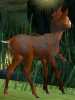
This is Vilnius
He will not get up and attack you at random.
He will simply move away if you bother him unless you are persistant.
However.
I ask that you please not spell his antlers off if you're not looking for a fight.
This is just a warning so that nobody's feelings are hurt<3
July 14, 2010 - 3:07am — Kkylah
So today I had found my self playing again. But today, I wanted to practice communicating with other users. I found it difficult at first, but after awhile, the actions, seemed more and more like words.
But before this, I was more than annoying. I was hopping and following others, some in which were very irritable (wouldn't blame them). But after a bit, I had found my self playing with a stag. Whose pelt I made a peacock, then he/she shrunk me, but it all ending in both of us dancing for no reason.
Now, I must say, I wasn't the only annoying one, I was being followed by another fawn, who kept making the noise (the one that sounds like "RRRRWWWWAAAAAUUUUUU" (so annoying)
I think I now know how others felt when I did the same. Hee hee, but untill tomorrow, this has been my adventure in the endless forest, day two.
Any ways, I haven't checked out the forum yet, so if you did want to PM me, please don't, instead you can e-mail me, or add me to your msn: . Other than that, please keep a look out for my next blog!
-Kkylah
July 14, 2010 - 3:07am — Kkylah
July 14, 2010 - 2:32am — estherose123
hello! im wondering if anyone knows me on the game. i know Mikuru but i dont know anyone else. either i forgot them or we havent met please tell me if you know me in the comments!
Thanks!
July 14, 2010 - 2:16am — Pegasicorn
July 14, 2010 - 1:44am — Swifttail
Why there are Trees
A Forest Fable by Yours Truly
~~~~~~~~~~~~~~~~~~~~~~~~~~~~~~~~~~~~~~~~~~~~~~~~~~~~~~~~~~~~~~~
The forest rustled with the sounds of waking creatures as the morning sun drifted up from the horizon. Grass was lit up with light and flowers stretched up to greet the sun.
The river practically bubbled with merriment and the fish in the pond swam about gracefully, as they always do.
A young doe opened her eyes to this wonderful forest of light and happiness, smiling. She got up, stretching as she trotted towards the Old Oak.
As she approached it, a fawn ran towards her. “Swift! Swifttail! You’re here!” the young fawn cheered, stepping into pace with the surprised doe.
“Oh yes, of course! I wasn’t going to miss this!” she replied, brimming with mirth.
The Old Oak loomed protectively above their heads as the hollow came into view. A rather large group of fawns grouped together inside.
Swifttail stopped in front of them all, glancing over them with adoration. ‘I just love fawns…I guess this year’s rut was very successful.’
“Welcome fawns! You guys wanted to hear a story, right?” she asked, a grin on her face.
The fawns laughed. One yelled over the others. “C’mon, I don’t think you’d forget!”
She smiled, waiting for them to calm down. “Okay then. One of you guys scoot, I wanna sit too!”
They all giggled as a gray fawn moved to the side so Swifttail could sit.
“Okay guys, what kind of story would you like to hear about?”
An outburst of answers.
“Oh! The stars!”
“The Pond!”
“Birds!”
She yelled over them all. “Quiet down! Okay, you in the back there.”
A small brown one stood up to be seen, poppies adorning her small head. “One about the trees?” she asked in a small voice.
Swifttail nodded. “Then okay. Now, once there was a beautiful meadow with many different flowers and animals, mostly deer like us.
July 14, 2010 - 12:04am — SweetClover
Um, I'm not sure what to do. I know you really not supposed to do ANYTHING, but I don't understand how to interact with other deer.... Or anything for that matter XD So, if anyone could give me a crash-course in how to play and enjoy this game, that'd be great...
July 13, 2010 - 11:59pm — gone
July 13, 2010 - 11:15pm — Kittyo8
-------